Showing posts with label Microsoft. Show all posts

Microsoft Offers Discounts on Softwares

Posted by Prem Godara | 3/15/2009 12:35:00 AM | , , , | 0 comments »

Its a good news that Microsoft offers discounts on Softwares. Microsoft has cut the price of leasing software by as much as 25 percent. Companies can sign up for discounts on SQL Server, SharePoint, and other Microsoft software, or two bundles of client-access licenses, according to notices posted on the Microsoft Incentives Web site.

One special promotion is "Simplify and Save," which offers savings of 15 percent for those who consolidate at least two existing license agreements into an Open Value agreement. Microsoft said the discount will run for the entire length of a three-year license deal.


Another offer is for between 15 percent and 25 percent off the price of the license and the Software Assurance costs of running Exchange Server, Office Communications Server, SQL Server, Office SharePoint Server, Visual Studio, Office Project, and other Microsoft software.

The cuts are similar to those that Microsoft has made on the cost of licensing specific products. The Microsoft Office Project Assurance Pack's price has been cut by 25 percent, and Microsoft Project Server 2007 has seen a similar price fall.

According to one analyst, Microsoft does not communicate enough people, when it comes about these special offers. "This is good news for users but Microsoft should be shouting about offers like this," said Tony Lock, analyst with Freeform Dynamics. "Software Assurance is not widely recognized and deals like this, which seems pretty much across the board of Microsoft software, should be better known."

Lock said that, while Microsoft has good market share, it is "not nearly as good as it could or should be, given offers like this."


Read more...

Do you want to try out all versions of Internet Explorer which are released till date? Then you must surely download the Internet Explorer Collection pack.

This pack is free for download which includes all versions of Internet Explorer from version 1 (4.40.308) to the new Internet Explorer 8 (8.00.6001.18372). All versions of Internet Explorer are standalone and can be installed at the same time on your computer.


This pack also includes the Internet Explorer Developer Toolbar 1.00.2188.0. This Toolbar provides a variety of tools which makes troubleshooting of websites a lot easier and is compatible with Internet Explorer 5.0 and higher when using Windows 2000 or higher.

Internet Explorer Collection 1.2.0.2 includes the following versions of IE:
  • Internet Explorer 1.0 (4.40.308)
  • Internet Explorer 1.5 (0.1.0.10)
  • Internet Explorer 2.01 (2.01.046)
  • Internet Explorer 3.0 (3.0.1152)
  • Internet Explorer 4.01 (4.72.3110.0)
  • Internet Explorer 5.01 (5.00.3314.2100)
  • Internet Explorer 5.5 (5.51.4807.2300)
  • Internet Explorer 6.0 (6.00.2800.1106)
  • Internet Explorer 6.0 (6.00.2900.2180)
  • Internet Explorer 7.0 (7.00.5730.13)
  • Internet Explorer 8.0 (8.00.6001.18372)
This pack is even compatible with Windows 7 and you can download (54.5Mb) this pack from Final Builds Site.


Read more...

Windows 7 will be Released Without Beta 2

Posted by Prem Godara | 2/01/2009 03:40:00 PM | , , , | 0 comments »

Microsoft has announced that there won't be a second beta of Windows 7, saying that the next test version of the operating system will be a near-final release candidate. Windows engineering head Steven Sinofsky announced the move in a blog posting on Friday, confirming that Microsoft would stick to earlier plans for just a single beta.

Given the estimated release date for Windows 7, we all expected that there would be only one beta before an RC. Microsoft proved the community right. Microsoft says, "With the RC, this process of feedback based on telemetry then repeats itself. However, at this milestone we will be very selective about what changes we make between the Release Candidate and the final product, and very clear in communicating them. We will act on the most critical issues. The point of the Release Candidate is to make sure everyone is ready for the release and that there is time between the Release Candidate and our release to PC makers and manufacturing to validate all the work that has gone on since the pre-Beta. Again, we expect very few changes to the code."

They still have not yet said anything about the release date. Although that is believed to be the goal, Microsoft has told partners that it is still too soon to commit for a 2009 release and it could yet be pushed into early 2010. Officially, Microsoft has said that it will have Windows 7 out within three years of the general availability of Windows Vista, which hit its two-year anniversary on Thursday.

In the meanwhile, for those who have not tried hands on Windows 7, the download availability for the Windows 7 Beta is still active.


Read more...

Windows 7 is still in the public beta process, and will be for some months to come. The purpose of true beta testing is to isolate and identify serious problems (we should know). During this testing, an unbelievable flaw in Windows 7 beta and Microsoft's User Account Control (UAC) feature, allows its protection to be defeated by any malware which happens to infect the system.

The malware needs only to send a series of false keystrokes from a Visual Basic script to activate the UAC dialog, move the slider bar to the disable position, and then save the changes. After that, the program can access protected functions or even reboot the system, thereby gaining full total system access on restart.

This type of security breach has been in use for as long as there have been PCs. In the old DOS days, a terminate and stay resident (TSR) program could invoke the system BIOS functions, wait for the password screen to appear then start issuing interrupt 16h instructions (which send fake keystrokes). Doing so would mimic the effect of a user pressing keys on a keyboard, and old DOS programs like Sidekick used to do this as part of their feature in order to provide DOS with copy-and-paste-like functionality, as well as pop-up abilities like a calendar, calculator, etc. Sidekick would intercept and send its keystrokes in this way.

Windows uses a message-based communication system internally. When a user presses a keystroke on the keyboard, the keyboard controller identifies which key was pressed (or released) and sends a signal to the motherboard, which then issues a hardware interrupt signal to the CPU. The CPU stops what it's doing (processing a spreadsheet, drawing some graphics in a game, whatever it is), and then retrieves the keystroke - sending it to the appropriate software algorithm (an internal keyboard handler). Such a handler allows keys to be remapped, intercepted, and all kinds of other things which allow for abilities macros, etc. But ultimately, the keystroke message, such as "KEY 'X' IS DOWN WHILE THE RIGHT-SHIFT KEY IS PRESSED," are sent to the appropriate program (or, more precisely, the appropriate "window" in Windows).

There is a simple fix to this problem. Microsoft can implement without sacrificing any of the benefits the new UAC model provides, and that is to force a UAC prompt in Secure Desktop mode whenever UAC is changed, regardless of its current state.

The discoverer wrote some simple code and also notes that this is apparently a Microsoft-purposed design feature of Windows 7, as related inquires appearing on Microsoft's beta page are all marked "closed."


Read more...

Windows XP Registry Hacks

Posted by Prem Godara | 1/31/2009 09:17:00 PM | , , | 0 comments »

If you are a Microsoft Windows XP user and looking for few Registry Hacks, then you have arrived at the right place. I have listed few Windows XP registry hacks.

Remove shared documents folder from My Computer

Open Registry Editor by navigating to Start -> Run and type regedit and hit enter. Then navigate to the following registry entry

HKEY_LOCAL_MACHINE\SOFTWARE\Microsoft\Windows\CurrentVersion\Explorer\My Computer\NameSpace\DelegateFolders

Look for sub-key named {59031a47-3f72-44a7-89c5-5595fe6b30ee} and delete it. This will remove the shared documents folder.

Customize Internet Explorer Title bar

Open Registry Editor by navigating to Start -> Run and type regedit and hit enter. Then navigate to the following registry entry

HKEY_CURRENT_USER\Software\Microsoft\Internet Explorer\Main

In right hand panel, look for string “Window Title” and change its value to whatever custom text you want to see.

How to remove recycle bin from your desktop

Open Registry Editor by navigating to Start -> Run and type regedit and hit enter. Then navigate to the following registry entry

HKEY_LOCAL_MACHINE\SOFTWARE\Microsoft\Windows\CurrentVersion\Explorer\
Desktop\NameSpace\{645FF040-5081-101B-9F08-00AA002F954E}

Delete it. This will remove recycle bin from your desktop.

Speedup boot time by defragmenting all key boot files

Open Registry Editor by navigating to Start -> Run and type regedit and hit enter. Then navigate to the following registry entry

HKEY_LOCAL_MACHINE\SOFTWARE\Microsoft\Dfrg\BootOptimizeFunction

In right hand panel look for Enable. Right click on it and set the value as ‘Y’ for enable. After doing this, you will see considerable decrease in boot time.

Improving shutdown time by closing apps quickly

Open Registry Editor by navigating to Start -> Run and type regedit and hit enter. Then navigate to the following registry entry

HKEY_CURRENT_USER\CONTROL PANEL\Desktop

Look for AutoEndTasks and change the default value 0 to 1.

That's it. You can further reduce the time it takes for Windows to issue kill all active/hung applications by changing the value of WaitToKillAppTimeout to say 3500. Make sure the HungAppTimeout is greater than WaitToKillAppTimeout since the default value for HungAppTimeout 5000 and for WaitToKillAppTimeout its 20000.


Read more...

Are Windows 7 Build 7025 Leaked Screenshots Fake?

Posted by Prem Godara | 1/30/2009 12:10:00 AM | , , | 0 comments »

The Windows 7 Build 7025 screen shots are said to be leaked by a Chinese website. Microsoft released Windows 7 Beta few weeks ago and the only version that was released during this beta was Windows 7 Ultimate. It is still unclear about the different Windows 7 versions that Microsoft is planning to release.

Here are some of the screen shots that are leaked.


But one of the sites claims that the screen shots that got leaked might be fake. The reason for this suspicion is because the original build number at extreme right corner is always covered with PCBETA logo. Is it for hiding the build number? Might be. So lets just wait and watch may be it is a rumor or reality.


Read more...

Download Kaspersky Antivirus For Windows 7

Posted by Prem Godara | 1/28/2009 01:11:00 AM | , , , | 0 comments »

Kaspersky Lab, the developer of popular anti-virus for Windows has released a technical prototype of the latest anti-virus for Windows 7. The technical prototype is a complex solution for securing computers running under Windows 7. The prototype includes not only an antivirus component but an effective and fully functional firewall and anti-spam filter.


The prototype comes with a new user interface developed to meet the needs of both inexperienced and advanced users.The prototype is based on a new Antivirus engine which provides complete antivirus protection from all types of Internet threats.

“We knew the release of the new version of Windows would be a huge event for the IT community, which is why we were prepared for it,” said Alexey Kalgin, Director Product Marketing, Corporate Business Division, Kaspersky Lab. “Our company has always made support for Microsoft’s new operating systems a top priority. For example Kaspersky Anti-Virus for Windows Vista was released simultaneously with the operating system’s official launch. When Windows Server 2008 was released, Kaspersky Anti-Virus was the only antivirus product on the market certified by Microsoft. Users can now see for themselves how our antivirus protection technologies perform on the new platform.”

Kaspersky Antivirus for Windows 7 includes real time scanner, firewall and anti-spam protection. It is optimized for multi core systems and will be available for both 32bit and 64bit versions of Windows 7.

Download Kaspersky Antivirus Beta For Windows 7.


Read more...

A new cell phone music service that Microsoft launched in the UK is one of the most restrictive DRM-based music stores yet. Tracks can only be played on the phone and cannot be transferred to another device or even backed up on a PC.

The world's largest software maker just launched a mobile phone-based music store in the UK that charges nearly twice the price for media while offering even fewer rights. Dubbed MSN Mobile Music and tied to Microsoft's MSN Mobile portal, the service offers over one million songs and 10,000 videos to UK cell phone users from the big four labels.

MSN Mobile Music was launched in partnership with VidZone Digital Media and offers songs for $2.07 (£1.50), ringtones for $4.05 (£3), and videos for $2.77 (£2). These prices include a fairly steep premium over the standard 99¢ charged for most MP3s, though MSN Mobile Music is compatible with over 130 handsets.

The service can be reached via mobile browser at msn.co.uk if you're in the UK, otherwise it redirects to uk.msn.com. For more details visit here.


Read more...

HoneyComb - Windows Mobile 6.5

Posted by Prem Godara | 1/27/2009 01:46:00 AM | , , , , | 0 comments »

For the past few weeks there had been more rumors about the "honeycomb"-style home screen for the upcoming Windows Mobile 6.5. Now it has made its appearance in another leak.

Small-time handset manufacturer Compulab, has posted a few images of its upcoming handset supposedly running Windows Mobile 6.5 Alpha. The two screen shots show the honeycomb launcher and a full screen background image.

Windows Mobile 6.5 HoneycombWindows Mobile 6.5 Honeycomb

The screen shot of the honeycomb appears to be more friendly than the current application. But still this is only an alpha we’re looking at, so things can certainly change.

We can expect more of these leaks in the upcoming weeks as Mobile World Congress approaches and the expected announcement of Windows Mobile 6.5 draws near.


Read more...

Conficker Worm Spreads Across 15 Million PCs

Posted by Prem Godara | 1/27/2009 01:28:00 AM | , , , | 0 comments »

The worm called Conficker, Kido, or Downadup, has managed to infect almost 15 million Windows PCs to date and continues to spread. It has hit worldwide Windows PCs, not only in the United States, but in Britain, and abroad.

The worm hits Windows operating systems and can be spread in a variety of ways. These include by going on malicious sites, as well as USB memory sticks, etc. Microsoft actually patched this hole in Windows, but since not many people actually downloaded the patch, it still managed to infect many PCs. The best way to help protect yourself is to update your anti-virus software, put up a firewall, and install the Microsoft patches as needed. The Microsoft patch needed to protect from this worm is MS08-067.

But U.S. computer security firm Symantec noted on its blog last week that very few computers in North America had been infected, a trend which it attributed to the greater prevalence of legal and fully patched software."China, India and Russia all have a high percentage of pirated software in use and these countries also feature in the top 10 countries for Downadup infections," said the blog. "The lack of patching due to piracy may be a contributory factor to high infection rates in those countries," the blog concluded.

Security experts say the virus purpose is still unclear and the network of infected computers it has created has yet to be activated. Most such malicious software is used by criminal gangs to send spam or launch so-called denial of service attacks.

You can protect your system from getting infected by disabling AutoRun feature.


Read more...

When you uninstall programs or applications in the computer by using Add or Remove Programs option in the Control Panel, it gets completely uninstalled by deleting all the contents of the particular software in the system.

But there are times when even after you uninstall a program or software it still gets displayed in the add or remove programs. Sometimes you don’t want some unwanted items to show up in the Add or remove programs. Many of you think that it is not possible. But this can be achieved with a small registry hack. To do this..

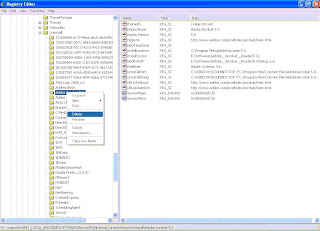
Open the Registry Editor ( Type REGEDIT in RUN window and Hit Enter ).

Navigate to HKEY_LOCAL_MACHINE\ SOFTWARE\ Microsoft\ Windows\ CurrentVersion\ Uninstall

Registry Editor

Remove any unwanted subkeys under "Uninstall" by deleting them.

This will remove the unwanted applications from the Add or Remove programs of Control Panel.


Read more...

How to Show Your Name on the Taskbar

Posted by Prem Godara | 1/24/2009 10:22:00 PM | , , | 0 comments »

This simple trick shows how you can show your name in place of AM and PM beside time on the Taskbar and make you feel proud among your friends.

To do this, Navigate to Start -> Control Panel -> Regional and Language option -> Customize (beside English US) -> Time.

Change AM, PM symbol to your name and click on Apply and Ok.

Now look at the Taskbar, your name would have got displayed beside the time.


In case, if it is not displayed, double click the time on the Taskbar and it will open “Date and Time” window.

Now, look for the time in digital form eg: 13:24:52 AM, click the arrow beside it to change the AM or PM.

It will show the name which you entered before. Select it and press on Apply and Ok.

This time surely it will work :-). Feel free to comment.


Read more...

In the last few weeks, a malicious worm called Conficker has exploited a critical flaw in Windows operating system infecting at least 9 million PCs, and is spreading rapidly across numerous corporate networks worldwide.

Conficker worm first disables system services like Windows Automatic Update, Windows Error Reporting, etc. and then downloads additional malware by connecting to a web server. The worm also attaches itself to certain Windows processes such as svchost.exe, explorer.exe and services.exe, every time you turn on your computer.

Your Windows System can be prevented from getting infected with Conficker worm by disabling the AutoRun feature.

To effectively disable AutoRun in Microsoft Windows, import the following registry value:

REGEDIT4
[HKEY_LOCAL_MACHINE\SOFTWARE\Microsoft\Windows NT\CurrentVersion\IniFileMapping\Autorun.inf]
@="@SYS:DoesNotExist"

To import the above value, perform the following steps:

1) Copy the text
2) Paste the text into Windows Notepad
3) Save the file as autorun.reg and double-click on the file to import it into the Windows registry

Microsoft Windows can also cache the AutoRun information from mounted devices in the MountPoints2 registry key. It is recommended to restart Windows after making the registry change so that any cached mount points are reinitialized in a way that ignores the Autorun.inf file. Alternatively, the following registry key may be deleted:

HKEY_CURRENT_USER\Software\Microsoft\Windows\CurrentVersion\Explorer
\MountPoints2


Read more...

Good News for all Microsoft users who want to try out Windows 7 Beta. The Windows 7 Beta end download date has been extended from January 24th to February 10th.

According to the Windows 7 Team Blog, "the shutdown of general availability for the Windows 7 Beta will occur in 3 phases over the course of the next few weeks:
  • Starting January 27th, the Windows 7 page will be updated with a warning that time is running out on downloading the Windows 7 Beta and that we will be limiting downloads shortly. People will be encouraged to register and start the download of the Windows 7 Beta sooner rather than later.
  • February 10th, new downloads of the Windows 7 Beta will no longer be available. People who have already started their Windows 7 Beta download and have not yet finished will still be able to finish their download and are encouraged to do so.
  • February 12th, people will no longer be able to complete their download of the Windows 7 Beta. Anyone who hasn’t finished downloading the Windows 7 Beta will be unable to do so.
Product keys for the Windows 7 Beta will continue to be available. So if you have the Windows 7 Beta but didn’t get a product key you will be able to do so even after February 12th.

MSDN and TechNet Subscribers will continue to have access to the Windows 7 Beta bits throughout the Windows 7 Beta phase. The above dates do not apply to MSDN and TechNet Subscribers".

In case, if you fail to download the Windows 7 Beta before February 12th, you can still download it from torrents and get the product key from Microsoft.


Read more...

In a keynote address at the 2009 International Consumer Electronics Show (CES), Microsoft Corp. Chief Executive Officer Steve Ballmer announced the beta availability of the Windows 7 operating system as well as the availability of the latest version of the Windows Live, a suite of personal communications services and applications.

“I’m thrilled to announce the availability of the Windows 7 beta, which is on track to deliver simplicity and reliability,” Ballmer said. “Windows 7 and Windows Live are part of an incredible pipeline of consumer technology that is making it easier than ever for people to communicate, share and get more done.”

Without mentioning the security and compatibility issues that have dogged Vista, Ballmer promised that Windows 7 will make PCs faster and easier to use. He didn't offer a timetable for its official release, although Windows Vista went on sale more than two years after it was issued in beta form.

The forthcoming operating system will have touch-screen capability, side-by-side windows for comparison shopping and a "Peek" feature that makes open windows transparent, allowing users to see the icons on their desktop.

The beta version of Windows 7, Microsoft’s next-generation PC operating system, can be downloaded today by MSDN, TechBeta and TechNet customers. Consumers who want to test-drive the beta will be able to download it beginning Jan. 9 from Microsoft's website. Of course, many of you might have already downloaded it from torrent sites when it was leaked to the Internet in beta form in late December. Early reviews of Windows 7 when it was leaked has been positive.

Microsoft also announced the global availability of Windows Live, a free suite of communications and sharing applications. Windows Live makes it easy for people to communicate, share and keep their online lives in sync and in one place with one login. The new and enhanced Windows Live services — including PCMag.com 2008 Editors’ Choice winner Windows Live Messenger — along with Windows Live Mail and Windows Live Photo Gallery are designed to work seamlessly with more than 50 popular Internet services.


Read more...

IE Loses its Share due to High Rivalry

Posted by Prem Godara | 1/05/2009 12:25:00 AM | , , , | 0 comments »

As we all know, IE is facing an increase in its competitors around the late 2008 with the debut of Mozilla Firefox browser 3.1 and Google Chrome 1.0.

The latest figures released by Net Applications, a company that tracks the browser usage, have shown that in December 2008, Internet Explorer was used by only 68.15% of Internet users, while Firefox has managed to maintain its market share over 20 percent, being used by 21.34% of users. And Apple's Safari pressed on to 7.93 percent, whereas Google's Chrome browser moved to 1.04 percent share, marking the first time the browser has hit the 1 percent milestone.

The browser has lost a massive amount of market share however since it hit its peak in 2003 at 94.43 percent. Even at the beginning of 2008 IE was cited as having just over 77 percent of market share.

Of the top four non-Microsoft browsers, only Opera Software ASA's flagship application failed to grow its share; it stayed at 0.71% in December, the same as in November. While December and November have traditionally been tough months for IE, lets see whether it regains back its share by the release of IE8 in 2009.


Read more...

Windows 7 Leaked by Microsoft?

Posted by Prem Godara | 1/03/2009 03:16:00 PM | , , , , | 0 comments »

Windows 7 Beta 1 got leaked onto BitTorrent sites like wildfire around Christmas and many people got it as Christmas present from BitTorrent sites to see how the successor of Windows Vista will look like but the timing of the leak looks like it has been deliberately leaked by Microsoft itself?

The reasons which indicates Microsoft's hand in the leak are:

The leaked build hit BitTorrent sites right after Christmas when the Windows geeks had nothing better to do and bloggers and journalists had nothing better to write about.

The official Windows 7 Beta 1 will be released some time in January but this trial version will give people a good idea about what they’ll be getting because the leaked build is designated "7000," which strongly suggests that the code could be same as forthcoming Beta 1, or close to it.

Windows 7

This leak lets Microsoft to get ahead of Apple since Microsoft knows that Apple is preparing to release Snow Leopard at Macworld. Microsoft might have decided that an early leak might make its potential customers happy because they will get a good taste of Windows 7 few weeks earlier before the release.

This leak will give immeasurable marketing benefits because Google news search is already showing hundreds of stories related to Windows 7 Beta 1.

This time Microsoft has turned blind eye to the leak which looks very inconsistent if we look at Microsoft's past history in cases of piracy.

If you are already trying out Windows 7 Beta 1, then let us know how its different from Windows Vista?


Read more...

Most Awaited Windows 7 Beta 1 Leaked

Posted by Prem Godara | 12/30/2008 01:48:00 AM | , , | 0 comments »

When most of us are nailbiting to work on Windows 7 by expecting the official release of Windows 7 Beta 1 around January 2009, sources proves that the Beta 1 version has been leaked. This Microsoft’s new and upcoming operating system is currently in the development phase.

But according to CNET, there are leaks already exists which allows people to test and try on it. People who has tried on these leaks has even reported few flaws which has been identified. There are almost 1,800 people seeding the operating system in the Pirate Bay, a torrent website, inspite of the offical release. This will be a 2.44 gigabytes download size file.

Microsoft has just started sending out invitations for the Windows 7 Beta 1 testing program. This successor to Windows Vista, Build 7000, or Beta 1, of Windows 7 is nothing more than Build 6801 with a few tweaks added to it. This Beta 1 of Windows 7 seems to be solid and stable which addresses a lot of the complaints and issues that Windows Vista currently has.

Let us know if you try downloading from the torrents and get the hands on of the original version before the release.


Read more...

Microsoft's New 9-Year-Old Certified Professional

Posted by Prem Godara | 12/27/2008 04:01:00 PM | , | 0 comments »

Microsoft's Certified Professional exam is designed for IT professionals. As you know accomplishing Microsoft's Certified Professional exam with flying colors is an achievement according to various IT professionals. A girl named Lavinashree, who is nine years old, from the Tamil Nadu region of India, passed Microsoft's exam this week, according to Indian media reports. As you see, though, being ahead of her age is nothing new for this young gal as she has been breaking records since she was three.

LavinaShree
Lavinashree is now the youngest person to ever do so, breaking a previous record held by a 10-year-old girl Arfa Karim, from Pakistan. By achieving this feat, the girl has boosted all our self confidence for the people from India to achieve more and more. Hope this fourth standard girl will be role model for many of us.


Read more...

It might be a surprise for many people but Microsoft has increased the storage space for their free online storage service, SkyDrive from 5GB to 25GB, making it one among the largest free online storage providers. The look and feel of the SkyDrive has been changed and now it has been opened up for 6 more regions and 13 more languages.

Below are the few things, you will find in new SkyDrive:
  • Free storage space increased to 25GB
  • Now entire folders can be downloaded as ZIP file(s).
  • Photos can be viewed in beautiful slide show.
  • Files can be shared with users who don’t have Windows Live ID, just by using their email addresses.
But on the downside, the Windows Live Photo Gallery is still not linked to SkyDrive so you have to upload your photos one by one, which may take weeks.

One more downside is the individual file size restriction, which is 50MB. So incase you are thinking about uploading a file which is more than 50MB, then you have to split the file and then upload.

Hope, Microsoft looks into the following issues and resolves it in the next update!!.


Read more...

Your Ad Here