
Apple has announced an update to the iPhone operating system. The update will be available this summer as a free upgrade for the iPhone 3G, and for $9.95 for the iPod touch. This update is come out with the most awaited enhancement in iPhone, the Cut-Copy & Paste feature.
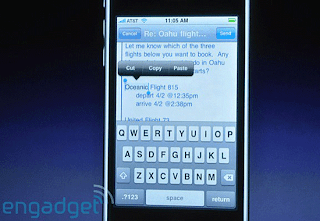
Apple said that they’ve been working really hard on the UI for cut, copy & paste functions in the new iPhone 3.0 OS and now this is how it works:
1. Double tap on text, and it automatically selects it — then puts grab points at the end of the selection, with a cut/copy/paste bubble above it.
2. To select a whole block, you double tap, slide with your finger or thumb (you get a new magnifying glass), and pull across what you want to grab.
3. Select Cut or Copy. And Paste it anywhere; Mail, Browser, Notes, SMS, or even within 3rd party apps.
4.You can even Shake the iPhone to UNDO.
Apple said that they’ve been working really hard on the UI for cut, copy & paste functions in the new iPhone 3.0 OS and now this is how it works:
1. Double tap on text, and it automatically selects it — then puts grab points at the end of the selection, with a cut/copy/paste bubble above it.
2. To select a whole block, you double tap, slide with your finger or thumb (you get a new magnifying glass), and pull across what you want to grab.
3. Select Cut or Copy. And Paste it anywhere; Mail, Browser, Notes, SMS, or even within 3rd party apps.
4.You can even Shake the iPhone to UNDO.
Read more...


 He also added, while no specific details were given as to the parameters of their teamwork, it was mentioned that Flash Lite will not be an acceptable alternative as it’s too feature-limited as opposed to the real thing. However, Flash itself is resource-heavy which is too much for the small processor of the iPhone or any smart phone for that matter to handle which is the real challenge in making the much-awaited feature finally available on Apple’s mobile phone.


 Once you enable offline Gmail, Google Gears downloads a cache of your mail; then, when ever you have a limited or no connectivity, Gmail can switch to offline mode. You can send and receive messages (which will be saved in your outbox and then will be sent when Gmail detects a connection) and also use other Gmail features as if you're online.


